
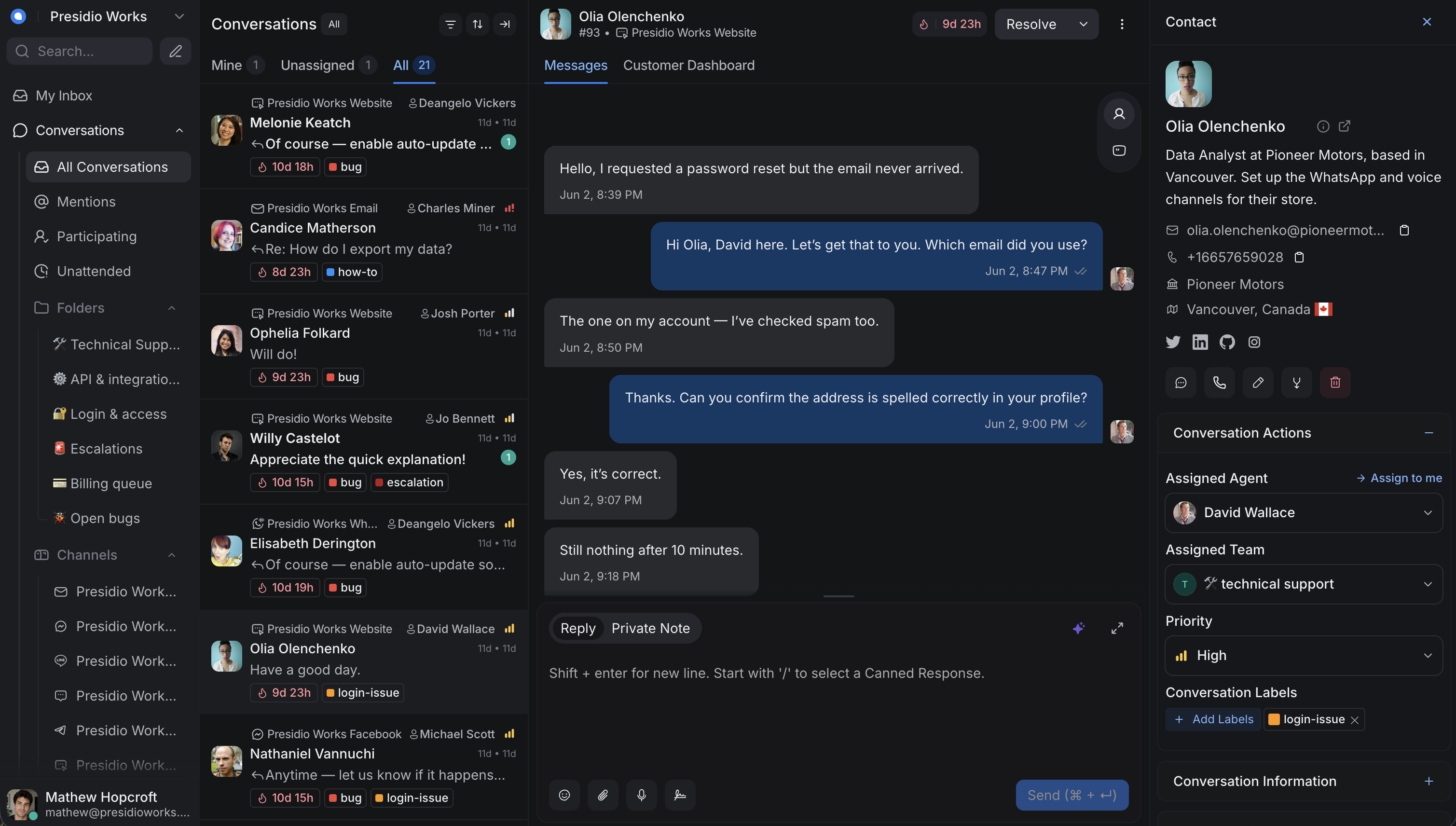
One inbox for your entire team
Manage all customer conversations in a single, unified inbox. Collaborate with your team using private notes, assignments, and shared context.
Connect every channel to one workspace
Live chat, WhatsApp, and your developer API feed straight into the shared inbox — customize the widget to match your brand in real time.
Create a live chat widget that fits your brand
Customize colors, language, text, and design to fit your brand effortlessly. Engage with customers in a way that feels authentic.
Learn more →Engage with your customers on WhatsApp
Send rich content messages, share updates, and build more personal connections effortlessly.
Learn more →Solve custom use cases with our API
Extend IntelyChat with custom integrations. Use our developer APIs to build solutions that fit your specific support needs.
Learn more →Follow your order here!
View Live Location
Everything your team needs to collaborate
A shared workspace where your team can work together to resolve customer queries efficiently.
Unified Inbox
Every channel lands in one queue
Private Notes
Internal discussion inside conversations
Team Assignments
Route queries to the right people
Labels & Tags
Organize and filter conversations
Canned Responses
Reply faster with saved templates
@Mentions
Pull teammates in when you need help
Multiple Inboxes
Organize by team, channel, or brand
Create separate inboxes for different teams, products, or channels — each with its own agents, SLAs, and automation rules.
- Unlimited inboxes for different teams or channels
- Assign agents to inboxes based on expertise
- Different business hours per inbox
- Separate auto-assignment rules per inbox
- Performance metrics tracked by inbox
Inboxes
+ New InboxWebsite Chat
5 agents · 24 open
Email Support
3 agents · 12 open
2 agents · 8 open
Instagram DMs
2 agents · 3 open
Customer · 10:32 AM
Private note
@Maria can you check the billing system? I see a duplicate charge.You · 10:34 AM
Private note
Confirmed — it's a duplicate. Refund initiated, you can let them know.Maria · 10:36 AM
Private Notes
Collaborate without the customer seeing
Use private notes to talk with your team inside any conversation, and @mention teammates to bring them in when you need help.
- Internal notes that only your team can see
- @mention teammates to get their attention
- Share context and hand off conversations easily
- Keep a record of internal discussions
- Slack integration for note notifications
Canned Responses
Reply faster with saved responses
Keep a library of pre-written replies for common questions — insert them with a slash command and personalize before sending.
- Build a library of reusable response templates
- Insert with slash commands (/greeting, /refund)
- Personalize with variables before sending
Hi John, I understand you're facing an issue with |
Type / to insert a canned response
Built for team collaboration
Everything your team needs to work together seamlessly.
Agent Assignment
Send conversations to the right team member, manually or automatically.
Teams
Group agents into teams with round-robin conversation distribution.
Conversation Labels
Organize and filter conversations with custom labels.
Typing Indicators
See when a teammate is replying to avoid duplicate responses.
Conversation Status
Track conversations as open, pending, snoozed, or resolved.
Activity Log
A full trail of every action taken on a conversation.
Bring your team together
Stop losing conversations across tools. Get a shared inbox that keeps your team aligned and your customers happy.